
Most SEO blog workflows fail in the same place: the handoff. The brief lives in one tool, the draft in another, and the optimization checklist in a spreadsheet nobody opens. This workflow keeps all four stages — brief, draft, optimize, publish — inside two tools, and it works because each tool is used only for what it is actually good at. Semrush Content Toolkit handles the SEO thinking. Grammarly handles the sentence-level quality. Neither tool is asked to do the other’s job.
Verdict & Pricing Snapshot
| Tool | Starting price | Free trial | The limit that matters |
|---|---|---|---|
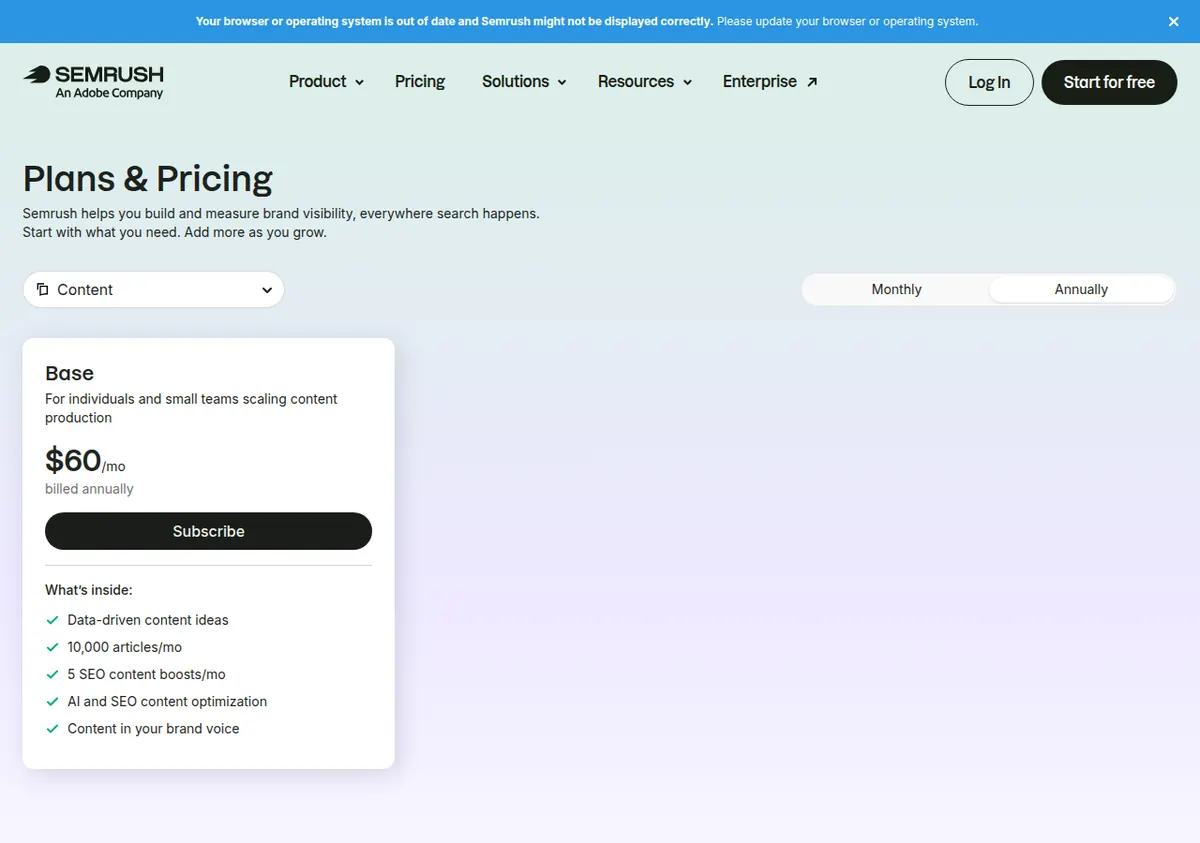
| Semrush Content Toolkit | $60/mo on annual billing | 7 days | 5 SEO-boosted articles/mo; unlimited standard AI articles |
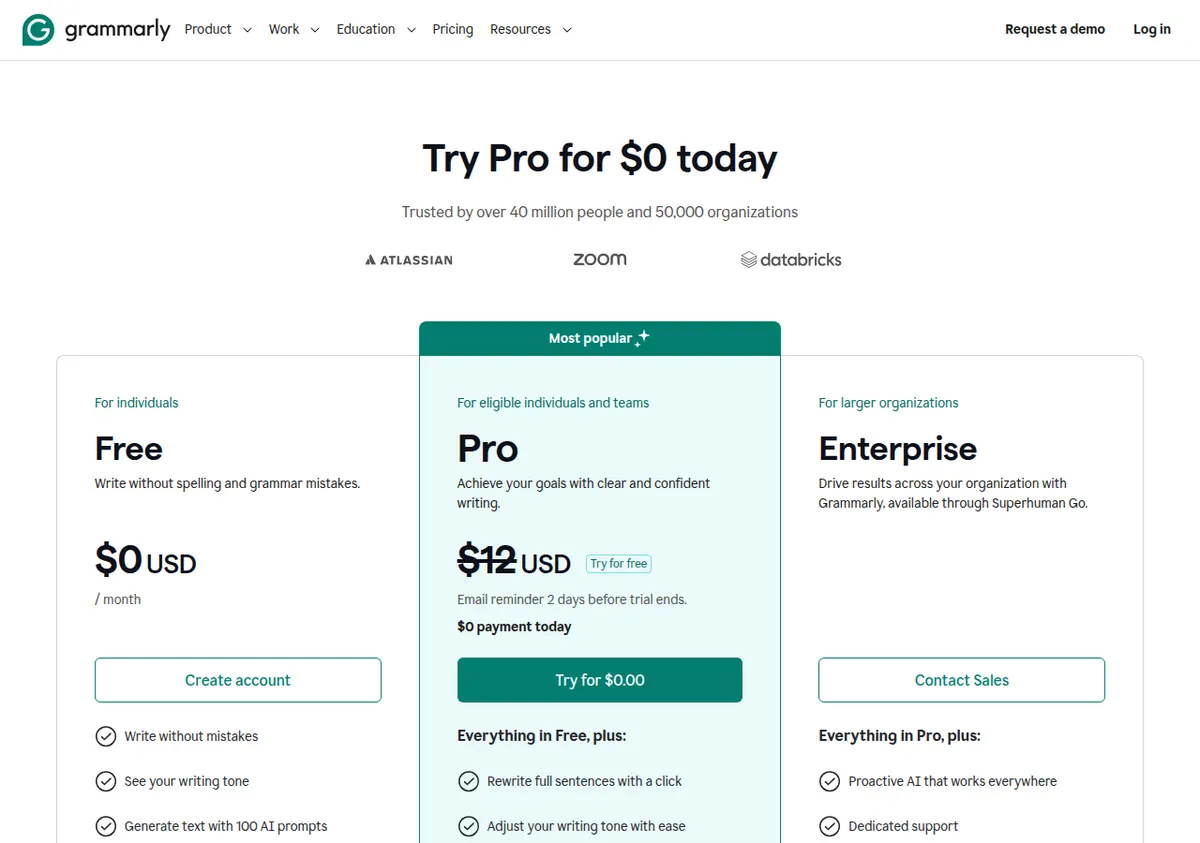
| Grammarly Pro | $12/member/mo on annual billing ($144/member/yr) | Try for free, with an email reminder 2 days before it ends | 2,000 AI prompts/member/mo; 1 style guide, 1 brand tone |
Who should use this workflow: a solo creator or small team publishing 4–5 SEO articles a month who wants keyword-backed briefs and a real editing pass without hiring an editor. Who should skip it: anyone publishing more than 5 SEO articles a month (the boosted-article cap will bite immediately — see the cost math below), and anyone who needs the full Semrush SEO suite, which is sold separately and is not included in the Content Toolkit. The Content Toolkit has no free tier, and no monthly-billing price is published — check the official site for current monthly pricing.
Why this pairing works
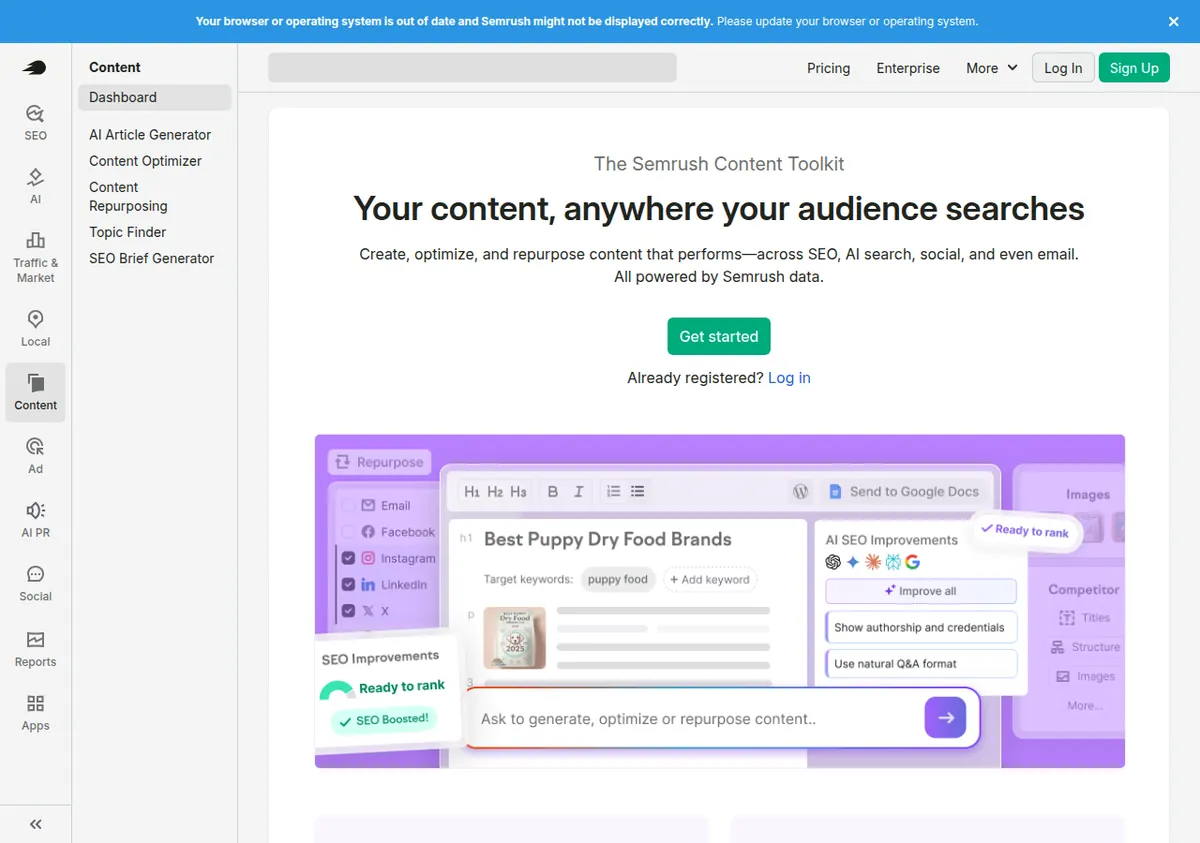
The two tools cover opposite ends of the quality problem. The Content Toolkit’s job is to make sure the article targets a real keyword, answers the questions searchers actually ask, and is structured to compete with the pages already ranking. Grammarly’s job is to make sure the finished article reads like a person wrote it: clear sentences, consistent tone, no grammar slips, no accidental plagiarism.
Used in the wrong order, they waste each other. Running Grammarly on a draft before the SEO structure is settled means polishing sentences you are about to delete. Running the Content Optimizer on text that has never been edited means optimizing awkward phrasing into a higher score. The order below is deliberate: structure first, draft second, optimize third, edit last.
A note on what this workflow does not include: the Content Toolkit is not the full Semrush suite. Keyword research databases, site audits, and backlink analysis live in Semrush’s main SEO plans, which are sold separately — third-party figures from October 2026 put the main suite’s Pro plan at $139.95/mo on monthly billing, but Semrush’s official pricing page now shows renamed plans (SEO, Starter, Pro+, Advanced), so re-check the live page before budgeting for the full suite. The minimum realistic stack for this workflow is an SEO plan plus the $60/mo toolkit. If you already have a Semrush SEO subscription, the toolkit is the add-on; if you do not, budget for both.
Stage 1: The brief (Semrush Content Toolkit)
Time: 30–45 minutes per article. Cost: 1 of your 5 monthly SEO-boosted articles, used at the draft stage — the brief itself does not consume a boost.
Every article starts with a brief, and the brief is where most SEO content goes wrong. A brief written from a keyword alone produces an article that repeats the keyword and says nothing. A brief built from the Content Toolkit’s topic ideas and SEO briefs starts from the search results instead: what the ranking pages cover, what questions they answer, and where the gaps are.
Step 1 — Pick one topic, not one keyword. Use the toolkit’s topic ideas to find a topic with a clear search intent. A topic like “how to choose a standing desk for a small apartment” is a brief; a keyword like “standing desk” is not. If the topic cannot be stated as a question a real person would type, it is too broad. Narrow it until it can.
Step 2 — Generate the SEO brief. The toolkit produces an SEO brief for the topic: recommended headings, questions to answer, and the terms the top-ranking pages use. Treat the brief as a coverage checklist, not a writing assignment. Your job is to make sure every heading earns its place — if a recommended section duplicates another, merge them.
Step 3 — Set the brand voice before anyone writes a word. The Content Toolkit includes a brand voice setting. Configure it once, from your best existing article, and reuse it for every brief. This is the cheapest quality control in the whole workflow: a brand voice set at the brief stage shapes every draft that follows, and it costs nothing extra.
Step 4 — Decide the article’s one job. Write a single sentence at the top of the brief: what the reader should be able to do after reading. “Choose the right desk size for a room under 100 square feet” is a job. “Learn about standing desks” is not. If the draft drifts later, this sentence is the test for cutting it.
Step 5 — Assign the boost. You get 5 SEO-boosted articles a month on the $60/mo annual plan. A boosted article is the one that gets the toolkit’s full SEO treatment. Decide now which articles get a boost and which do not — do not decide at publish time, when the pressure to boost everything is highest. A practical rule: boost the articles targeting keywords you can realistically rank for, and write the rest as standard articles. Standard AI articles are unlimited on the plan, so the non-boosted pieces still get drafted in the toolkit; they just do not get the boosted optimization pass.
Stage 2: The draft (Semrush Content Toolkit)
Time: 1–2 hours per article. Cost: unlimited standard AI articles are included; a boosted article consumes 1 of 5 monthly boosts.
Step 6 — Draft from the brief, not from a blank prompt. Generate the draft inside the toolkit, against the brief from Stage 1. The draft is a first pass, not a finished article. Expect to rewrite the introduction and the conclusion yourself — AI introductions are where generic phrasing concentrates, and the introduction is the part readers actually judge.
Step 7 — Check coverage, not word count. Before editing a single sentence, check the draft against the brief’s coverage checklist. Every recommended heading should be present or deliberately cut. A 2,000-word draft that misses the section searchers actually want is worse than a 1,200-word draft that covers it. Word count is not a ranking factor; coverage is what the brief was for.
Step 8 — Add the things AI cannot generate. This is the step most AI workflows skip, and it is the step that separates articles that rank from articles that read like every other AI article. Add at least two of the following to every post: a specific number from a real source (a price you checked, a measurement you took), a screenshot of the thing you are describing, or a concrete example with a name and a place in it. The Content Toolkit can draft; it cannot have experience. If your article contains nothing that could only come from you, it will read like it came from anyone.
Step 9 — Fix the structure before the sentences. Read the draft’s headings in isolation, top to bottom. They should tell the story of the article on their own. If they do not — if two headings say the same thing, or the order jumps from advanced to basic and back — restructure now. Restructuring after the editing pass means re-editing everything below the move.
Stage 3: Optimize (Semrush Content Toolkit)
Time: 20–30 minutes per article. Cost: this is where the 5-boost cap applies.
Step 10 — Run the Content Optimizer on the boosted articles. The Content Optimizer scores the draft against the pages competing for the same topic and flags what is missing: terms to add, questions unanswered, sections that are thin. Work through its recommendations in order of impact, not in the order listed. A missing section that searchers expect matters more than a missing keyword variant.
Step 11 — Treat the score as a signal, not a target. The optimizer produces a score, and the temptation is to chase a perfect one. Do not. A score in the competitive range for your topic is enough; pushing past it usually means stuffing terms into sentences that were fine. If the optimizer wants a term that makes a sentence worse, leave the sentence alone. Readability is part of what keeps a reader on the page, and a reader who bounces does not care about your score.
Step 12 — Decide what the non-boosted articles get. With only 5 boosts a month, most teams will have articles that never see the optimizer. For those, do a manual pass instead: check the title and first paragraph against the search intent, check that the headings cover the brief, and check that every claim has a source. That manual pass takes 10 minutes and catches most of what the optimizer would have caught on a straightforward topic. Save the boosts for competitive keywords where the optimizer’s gap analysis actually changes decisions.
Stage 4: Edit and publish (Grammarly)
Time: 20–40 minutes per article. Cost: a fraction of Grammarly Pro’s 2,000 AI prompts/member/mo.
Step 13 — Run the full Grammarly check on the final draft. Grammarly Pro catches what the optimizer never will: grammar and spelling errors, awkward phrasing, and tone drift. The Pro plan’s full-sentence rewrites and fluency suggestions are the ones that matter here — the free plan covers basic grammar and spelling, but rewrites and tone adjustment are Pro-only. If you are editing on the free plan (100 AI prompts a month), you will run out of AI prompts after roughly two or three articles’ worth of heavy rewriting. Budget accordingly: the free tier is fine for proofreading, not for rewriting.
Step 14 — Apply the style guide, not just the corrections. Pro includes 1 style guide and 1 brand tone. Set the style guide to your house rules — the spellings you prefer, the terms you always capitalize, the words you never use — and let it flag every violation across the article. This is where a multi-author blog stops sounding like five different people. One style guide is enough for a small team; if you need more than one, that is an Enterprise feature, and Enterprise is custom-priced through Superhuman Go.
Step 15 — Check tone against the article’s job. Grammarly’s tone detection tells you how the article sounds, not just whether it is correct. A how-to guide that reads as formal and distant will not hold a reader who came for a practical answer. If the tone reads as anything other than what the brief intended, rewrite the introduction and the transitions — tone problems live in the connective tissue, not in the body paragraphs.
Step 16 — Run plagiarism and AI-text detection. Pro includes plagiarism detection and AI-text detection. Run both before publishing. The plagiarism check matters because AI drafts sometimes reproduce phrasing from their training data closely enough to match published text. The AI-text detection matters because some readers and some platforms now check for it — and because a high AI-text score is usually a sign the draft still sounds generic, which is a writing problem regardless of who (or what) detects it. If the score is high, the fix is the same as Step 8: add specific, sourced, human material.
Step 17 — Publish, then measure. The Content Toolkit supports WordPress publishing to up to 100 sites, according to third-party sources — verify that limit on the official site before planning a multi-site setup. Publish from the toolkit or paste into your CMS; either way, record three numbers for every article the day it goes live: the target keyword, the optimizer score (if boosted), and the publish date. Check rankings at 30 and 90 days. An article that has not moved after 90 days is a candidate for a refresh pass through Stages 3 and 4, not for deletion.
The monthly cost math
The workflow’s cost is dominated by the boosted-article cap, not by the subscription prices. Here is what a month looks like at each publishing volume:
| Articles/month | Semrush Content Toolkit | Grammarly Pro (1 member, annual) | Total/mo |
|---|---|---|---|
| 4 | $60 (4 of 5 boosts used) | $12 | $72 |
| 5 | $60 (all 5 boosts used) | $12 | $72 |
| 8 | $60 + $30 for +10 boosts = $90 | $12 | $102 |
| 10 | $60 + $30 for +10 boosts = $90 | $12 | $102 |
| 15 | $60 + $60 for +20 boosts = $120 | $12 | $132 |
A few things to notice. First, the cost per article falls fast between 5 and 10 articles a month, because the $30 add-on buys 10 extra boosts — at 10 articles a month, the toolkit costs $9 per article. Second, Grammarly’s cost is nearly flat: 2,000 AI prompts a month is far more than one editor needs for 10 articles, so adding articles does not add Grammarly cost until you add team members. Third, the expensive mistake is publishing 6 or 7 articles a month and buying a 10-boost add-on to cover the extra one or two — either publish 5 and stay inside the base plan, or commit to 10 and use the boosts. The in-between volumes waste money.
Extra users on the Content Toolkit cost $20/user/mo, separate from the $20/member Grammarly cost — check the official site for current seat pricing before adding a second editor, and note that the main Semrush SEO plans charge extra users at a different rate (starting at $45/mo, according to third-party sources). Do not confuse the two seat prices.
A realistic weekly schedule
For a team publishing 5 articles a month, the workflow fits into one focused day a week:
- Monday morning (2 hours): Stage 1 and 2 for one article — brief, then draft. End the session with a draft that has real examples added (Step 8), not a raw AI draft.
- Monday afternoon (1 hour): Stage 3 and 4 for the previous week’s article — optimize, edit in Grammarly, publish. Working a week behind on the edit means you read the draft with fresh eyes, which catches more than editing the same day you wrote it.
- Friday (30 minutes): pick next week’s topic, generate the brief, and set the brand voice check. The brief is ready when Monday starts, so Monday is writing time, not deciding time.
The total is roughly 3.5 hours a week per article, or about 14 hours a month for 5 articles. Most of that time is human judgment — the brief decision, the examples, the edit. The tools do the mechanical parts. If the workflow is taking much longer than that, the problem is usually Stage 1: a brief that was too broad, which makes every later stage slower.
What this workflow does not do
It does not do keyword research at scale — that needs the full Semrush suite, not the toolkit. It does not replace a subject-matter expert — the toolkit can draft a credible-sounding article about a topic nobody on your team understands, and Grammarly will make it read beautifully, and it will still be wrong in ways your readers will notice. And it does not build links or promote the article; publishing is the end of this workflow, not the end of the job. If you need a comparison of the toolkit against a standalone AI writer for this same job, see our Semrush Content Toolkit vs. Jasper comparison. For the question of whether Grammarly alone can replace a second writing tool on a content team, see Grammarly vs. Writesonic for content teams.
Limitations / Who Should NOT Buy
- High-volume publishers should not use this workflow as-is. Five SEO-boosted articles a month is a hard cap on the base plan. If you publish 20 articles a month, you will spend $60 in boost add-ons alone ($30 per 10), and at that volume a different tool or a full Semrush plan may be cheaper. Count your real monthly volume before subscribing.
- Do not buy the Content Toolkit expecting the full Semrush suite. It is a standalone add-on. Keyword databases, site audits, and backlink tools are separate, and the minimum realistic stack is an SEO plan plus the toolkit. The full-suite Pro price of $139.95/mo is a third-party carry-over from before Semrush renamed its plans — check the official site for current pricing.
- Grammarly’s monthly billing is a trap. Pro costs $30/member/mo on monthly billing versus $12/member/mo on annual billing — 2.5 times more, or $360 a year instead of $144. If you are going to use Grammarly for this workflow, pay annually. The quarterly option ($20/member/mo, reported by independent sources) sits in between but is not shown on the official plans page.
- Grammarly Free will not carry this workflow. One hundred AI prompts a month is enough for light proofreading, not for rewriting drafts. If the budget only stretches to the free plan, use it for the final grammar pass and accept that the rewriting will be manual.
- The toolkit has no monthly-billing price published. If you need month-to-month flexibility rather than an annual commitment, check the official site — the price may not be what you expect, and the 7-day trial is the only way to test the toolkit before committing.
- AI-text detection is a signal, not a verdict. Grammarly’s detection can flag human-written text and miss AI-written text. Use it as a prompt to re-read, not as a pass/fail gate for publishing.
Sources
- Semrush Content Toolkit pricing page (semrush.com/pricing) and Semrush blog on AI content marketing tools (semrush.com/blog/best-ai-content-marketing-tools/): $60/mo annual, 5 SEO-boosted articles, +10 boosts $30/mo, 7-day trial, no free version.
- Grammarly plans page (grammarly.com/plans): Free $0 / 100 AI prompts; Pro $12/member/mo annual / 2,000 prompts, 1 style guide, 1 brand tone; Enterprise via Superhuman Go.
- Independent pricing checks: AI Copilot (2 Nov 2026), rctrl (18 Oct 2026), ClearPostPlugin (Oct 2026) on Content Toolkit limits; Chapter (Sep 2026), UsagePricing (9 Nov 2026), GoTechPresso (28 Oct 2026) on Grammarly pricing.
Prices checked 13 November 2026. They change — verify on the official pricing pages before you buy.