
Verdict & Pricing Snapshot
| Grammarly Pro | Writesonic Starter | |
|---|---|---|
| Starting price | $30/member/mo monthly; $12/member/mo annual ($144/member/yr) | $99/mo monthly; $79/mo annual |
| Free tier | Yes — Free at $0, permanent | None — old free tiers have been dropped |
| Free trial | Pro offered as “Try for free / $0 payment today,” email reminder 2 days before trial ends | Free trial, no credit card required |
| Core limit | 2,000 AI prompts/member/mo; 1 style guide; 1 brand tone | 15 AI articles/mo; 50 tracked prompts; 10 site audits/mo |
| Who should skip | Teams that need AI article generation, not editing | Teams that only need editing and already write their own drafts |
The short answer: most content teams do not need both — but the one to keep depends on where your bottleneck is. If your team already writes drafts and needs them cleaner, more consistent, and checked for plagiarism and AI text, Grammarly Pro at $12 a member a month on annual billing is the cheaper and more direct buy. If your team needs drafts generated and needs to know whether your brand shows up in AI search answers, Writesonic is the buy, and Grammarly becomes a useful but optional second layer. The overlap is real but narrow: both touch AI writing, but Grammarly edits and polishes while Writesonic generates and measures visibility. Paying for both makes sense only when you can point to a specific job each one does that the other cannot.
What each tool actually is
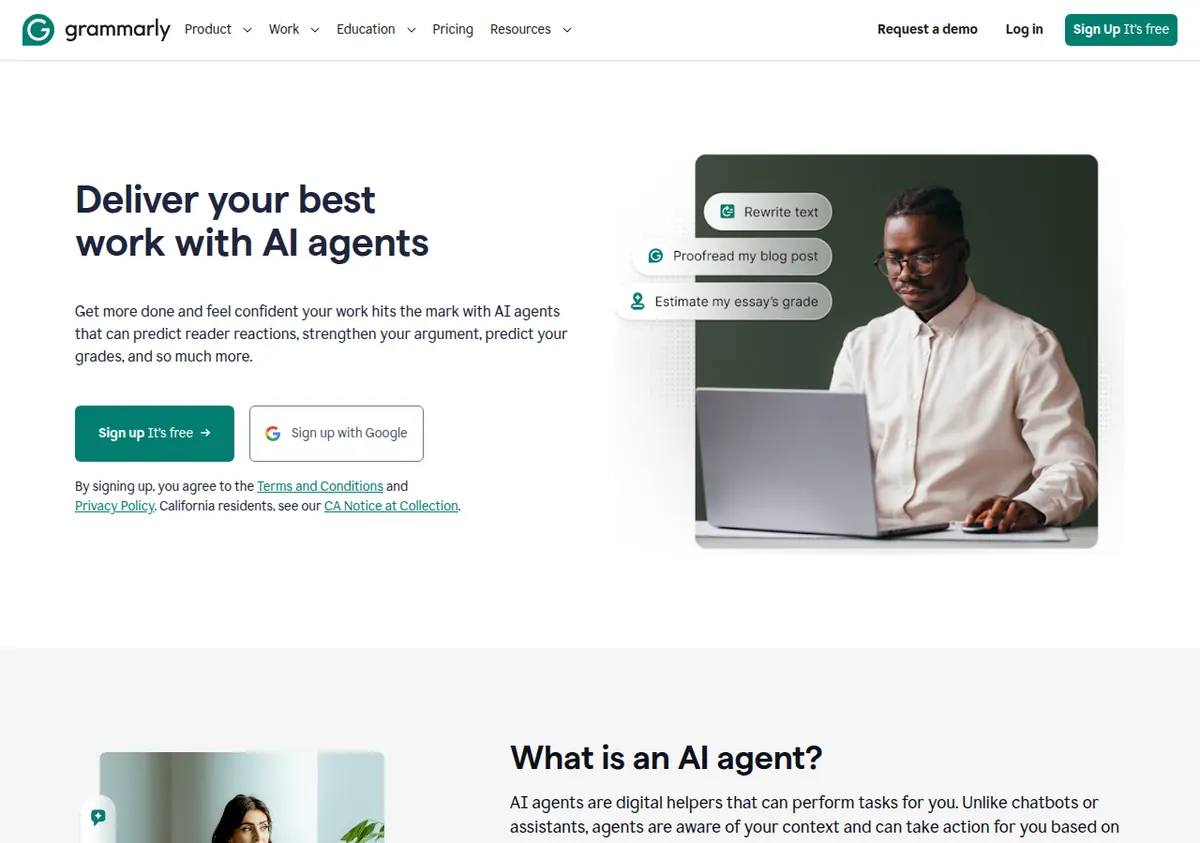
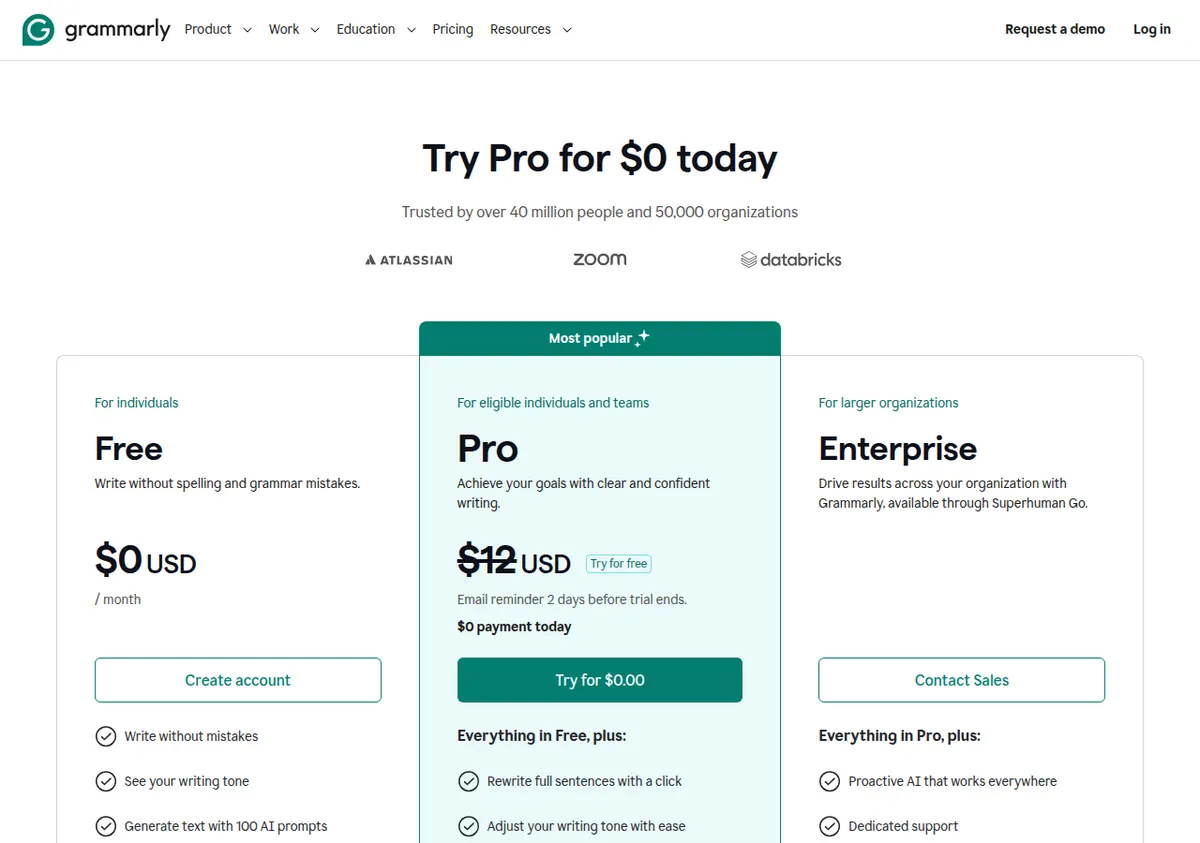
Grammarly is an editing and writing-assistance tool. Its Free plan covers grammar, spelling, punctuation, and tone detection, with 100 AI prompts a month. Pro adds full-sentence rewrites, tone adjustment, fluency improvements, plagiarism detection, and AI-text detection, plus 2,000 AI prompts per member per month, 1 style guide, and 1 brand tone. Enterprise adds unlimited AI prompts, unlimited style guides and brand tones, BYOK encryption, DLP, and dedicated support, and is sold through Superhuman Go after Grammarly’s parent company renamed to Superhuman in October 2025. The writing product is still called Grammarly.
The important correction first: there is no separate “Team Pro” plan anymore. The old Business plan was consolidated into Pro in late 2024. Pro is the team plan — up to 149 seats at the same $12-a-member-a-month annual rate. Do not look for a separate Team Pro tier, and do not budget for one. If your team has 150 seats or more, that is Enterprise territory, priced custom.
Writesonic is a different kind of product in 2026. It now positions itself as an AI search-visibility platform, not just an AI writer. Article generation is a capped module inside each plan, alongside tracked prompts across ChatGPT, Gemini, and Google AI Overviews, plus site audits. Starter gives you 15 AI articles a month, 50 tracked prompts, and 10 site audits of 100 pages each, for 1 user, 1 project, and 1 brand voice. The product’s question is not “is this draft clean?” It is “are we visible where buyers now ask questions, and is our site holding us back?”
Put side by side, the distinction is clean. Grammarly takes writing that exists and makes it better. Writesonic creates writing that does not exist yet and measures whether it gets seen. A team that writes its own drafts and struggles with consistency needs the first. A team that struggles to produce enough drafts and to be found needs the second. A team that struggles with both needs to decide which struggle costs more, because buying both at full price is a real budget commitment.
Pricing, plan by plan
Grammarly
| Plan | Monthly | Annual (per month) | Key limits |
|---|---|---|---|
| Free | $0 | $0 | Grammar, spelling, punctuation, tone detection, 100 AI prompts/mo |
| Pro | $30/member/mo | $12/member/mo ($144/member/yr) | Everything in Free, plus full-sentence rewrites, tone adjustment, fluency, plagiarism and AI-text detection, 2,000 AI prompts/member/mo, 1 style guide, 1 brand tone; team accounts up to 149 seats |
| Enterprise | Custom (via Superhuman Go) | Custom | Everything in Pro, plus unlimited AI prompts/member/mo, unlimited style guides/brand tones, BYOK encryption, DLP, dedicated support |
Grammarly’s pricing has the steepest monthly-versus-annual gap of any tool we cover: $30 a member a month on monthly billing versus $12 on annual billing. That is a 60 percent drop, or $360 a year versus $144 a year per member. Monthly billing is an expensive way to use Grammarly. If you are going to commit, commit annually. A quarterly option at $20 a member a month ($60 a quarter) is reported by multiple independent sources, but it was not shown on the official plans page excerpt in our research, so treat it as reported rather than confirmed and check the official site.
The Free plan is genuinely useful, not a demo. It is permanent, with no expiry, and includes grammar, spelling, punctuation, and tone detection, plus 100 AI prompts a month. One hundred prompts is small — a heavy user can burn through it in a week — but for light editing and for testing whether Grammarly fits your workflow, it is enough to learn from. The features that matter most to content teams are Pro-only: full-sentence rewrites, plagiarism detection, and AI-text detection. If your workflow requires checking freelance submissions for plagiarism or for AI-generated text, Free will not do it. That check alone justifies Pro for many teams.
Prices are geo-tested and can vary by region at checkout, so the $12 annual figure is the US list price, not a guarantee for every buyer. Verify at checkout.
Writesonic
| Plan | Monthly | Annual (per month) | Key limits |
|---|---|---|---|
| Starter | $99/mo | $79/mo | 15 AI articles/mo; 50 tracked prompts; 10 site audits/mo (100 pages each); 1 user, 1 project, 1 brand voice; 10 agentic-workflow trial runs |
| Basic | $249/mo | $199/mo | 25 AI articles/mo; 100 tracked prompts; 20 site audits/mo (1,200 pages each); add up to 3 extra users at $50/user/mo |
| Growth | $499/mo | $399/mo | 50 AI articles/mo; 200 tracked prompts; 50 site audits/mo (2,500 pages each); add up to 2 extra users at $50/user/mo; +20 articles add-on for $100/mo |
| Enterprise | Custom | Custom | All 8 tracked platforms (adds Perplexity, Claude, Grok, DeepSeek, Copilot, Meta AI, and Google AI Mode); SSO/SAML; dedicated strategist |
Writesonic has no permanent free tier. The trial requires no credit card, according to the official FAQ, and there is a 7-day, no-questions-asked refund. Annual billing saves 20 percent but is paid 12 months upfront.
The team math is where the two tools diverge sharply. Grammarly Pro at $12 a member a month on annual billing means a five-person team pays $60 a month, or $720 a year. Writesonic Starter at $79 a month on annual billing covers one user only — Starter cannot add users, according to the official comparison table — so a five-person team cannot use Starter at all. Basic at $199 a month on annual billing allows up to 3 extra users at $50 each, so a team of four on Basic pays $199 plus up to $150 in seat add-ons. Check the official site for the exact base seat count on Basic and Growth, which was not cleanly confirmed from the official table render in our research. Either way, the team cost of Writesonic is several times the team cost of Grammarly Pro, because Writesonic is priced as a platform, not as a per-member editor.
Where they overlap — and where they do not
The overlap is in AI prompts and in brand consistency, and it is worth mapping precisely so you do not pay twice for the same job.
Grammarly Pro gives each member 2,000 AI prompts a month. Writesonic Starter gives the account 15 AI articles a month plus 50 tracked prompts. Those are different units for different jobs. Grammarly’s prompts are for rewriting, shortening, expanding, adjusting tone, and improving fluency on text you already have. Writesonic’s articles are for generating a full draft from a topic. A Grammarly prompt can turn a rough paragraph into a clean one. It is not designed to produce a 1,500-word SEO article from scratch, and using 2,000 prompts that way would be slow and fragmented. A Writesonic article can produce that draft, but it will not then check it for plagiarism, detect AI text, or enforce your style guide sentence by sentence. That is Grammarly’s job.
Brand voice is the second overlap, and it is asymmetric. Grammarly Pro includes 1 style guide and 1 brand tone. That is enough for a single brand with one voice. Writesonic Starter includes 1 brand voice. Also enough for a single brand. Neither tool on its cheapest plan handles two brands or two distinct voices. Grammarly Enterprise removes the cap with unlimited style guides and brand tones; Writesonic’s higher plans do not solve the multi-brand problem in the same way — Growth is still built around a single account’s visibility tracking, and multi-project use is constrained by the plan’s project limits. If you manage multiple brands, neither starting plan fits, and you should price the upgrade before you commit.
The non-overlap is larger than the overlap. Only Grammarly does plagiarism detection and AI-text detection. Only Grammarly does full-sentence rewrites and fluency fixes as a core editing pass. Only Writesonic does tracked prompts across ChatGPT, Gemini, and Google AI Overviews. Only Writesonic does site audits. Only Writesonic generates full articles at a capped monthly rate. If your workflow needs plagiarism checks, Writesonic cannot replace Grammarly. If your workflow needs visibility tracking, Grammarly cannot replace Writesonic. The “do we need both?” question is really “do we need plagiarism and tone editing, visibility tracking, or both?” — and most teams can answer that by looking at what they actually do each week.
The content-team workflow, with one tool versus two
Consider a typical small content team: three people, one blog, publishing three posts a week, plus product pages and emails.
With Grammarly Pro only: the team writes its own drafts — in docs, in the CMS, or from briefs — and Grammarly polishes them. Rewrites fix awkward sentences. Tone adjustment keeps the blog consistent. Plagiarism detection checks freelance submissions. AI-text detection flags copy that reads as machine-generated, which matters if you publish guest posts or agency copy. The cost is $36 a month on annual billing for three members. The gap is generation and visibility: the team still has to write every draft from scratch, and nobody is tracking whether the brand appears in AI answers. If the team already writes well and on schedule, that gap may not matter. If the team is behind schedule every week because drafting takes too long, Grammarly alone will not fix the schedule.
With Writesonic only: the team generates up to 15 articles a month on Starter — roughly three to four a week — tracks 50 prompts, and audits the site. The drafting bottleneck eases. The gap is editing quality and trust: there is no plagiarism check, no AI-text detection, and no style-guide enforcement at the sentence level. Drafts will need a human edit, and that edit will be slower without Grammarly’s rewrite and tone tools. The cost is $79 a month on annual billing for one user, and the plan does not cover a three-person team at all — Basic at $199 a month is the realistic starting point for a team, plus seat add-ons.
With both: the team generates drafts in Writesonic, edits and checks them in Grammarly Pro, and tracks visibility in Writesonic. That is a coherent workflow, and it is the workflow our guide to building an SEO blog workflow with Semrush Content Toolkit and Grammarly describes in a Semrush context — the editing layer is the same idea, even when the generation layer changes. The cost for three people is roughly $199 a month for Writesonic Basic on annual billing, plus seat add-ons, plus $36 a month for Grammarly Pro. That is a serious monthly commitment for a small team, and it only makes sense if the volume justifies it: at least 15 to 25 generated articles a month, plus enough freelance or multi-author copy to need plagiarism checks every week.
Most teams should start with one and add the second only when the gap becomes a named problem. Start with Grammarly if your drafts exist but need cleaning. Start with Writesonic if your drafts do not exist fast enough or your visibility is unmeasured. Add the other when you can say, in one sentence, what it will do that the first tool cannot.
Head-to-head: who should pick which
Pick Grammarly Pro only if: your team writes its own drafts; your main problems are consistency, clarity, and trust — tone that drifts, sentences that need rewriting, freelance copy that needs a plagiarism check; your budget is tight; or you need a free tier to start. At $12 a member a month on annual billing, Grammarly Pro is the cheapest paid entry among the writing tools we cover, and the Free plan at $0 with 100 AI prompts a month is a real starting point. A five-person team pays $60 a month. No other tool in this comparison comes close on team price.
Pick Writesonic only if: your team needs generated drafts at volume — 15, 25, or 50 articles a month — and needs to track AI search visibility and audit the site; your bottleneck is production and discoverability, not polish; and you can afford at least $79 a month for a solo user or $199 a month for a team on Basic. Do not pick Writesonic only and expect it to replace an editor. It will not check plagiarism, and it will not enforce a style guide sentence by sentence.
Pick both if: you publish at least 15 generated articles a month, you use freelancers or multiple authors whose copy needs plagiarism and AI-text checks, and you track visibility as a KPI. That is a real, specific profile — a content operation, not a blog. If that is not your profile, buying both is paying for a workflow you do not run.
Pick neither yet if: you publish less than once a week, or your content is mostly product descriptions rather than articles. For product copy, our roundup of the best AI copywriting tools for ecommerce compares Grammarly, Writesonic, and Jasper on real SKUs, where the volume math and the voice math are different. For a single-brand blog, also consider our comparison of Jasper vs Writesonic, which covers the voice-versus-visibility trade-off when generation is the main job, and our comparison of Semrush Content Toolkit vs Jasper, which covers the SEO-workflow side.
Limitations / Who Should NOT Buy
Do not buy Grammarly Pro if: you need AI article generation. Grammarly’s 2,000 prompts a month are for editing and rewriting, not for producing full drafts at volume. Do not buy it expecting a content generator, and do not buy it on monthly billing if you can avoid it — $30 a member a month is two and a half times the $12 annual rate, the steepest gap we cover. Also, do not expect Pro’s 1 style guide and 1 brand tone to cover multiple brands; Enterprise is the plan that removes those caps, and it is custom-priced through Superhuman Go.
Do not buy Writesonic if: you only need editing. At $79 a month on annual billing for one user, Writesonic is an expensive editor that does not do plagiarism or AI-text detection. Do not buy it if you need more than 15 articles a month and cannot afford Basic; if you manage more than one brand or client on Starter, which allows only 1 project and 1 brand voice; if you need agentic workflows as a daily feature rather than 10 trial runs; or if your publishing schedule is seasonal, because monthly article and audit allowances expire with no rollover. Do not buy Writesonic for a team on the strength of the Starter price — Starter is one user, and the team price starts at Basic.
Do not buy both if: you cannot name, in one sentence each, what Grammarly does that Writesonic cannot and what Writesonic does that Grammarly cannot. “We might need both someday” is not a workflow. It is a subscription habit. Start with the tool that fixes the bottleneck you have this month, use the trial — Grammarly Pro’s free trial with a reminder two days before it ends, Writesonic’s no-card trial — and add the second tool only when the first one’s gap shows up in real work.
The bottom line
Grammarly Pro and Writesonic solve different problems at very different prices. Grammarly is the editing layer: $12 a member a month on annual billing, up to 149 seats, plagiarism and AI-text detection, 2,000 prompts a member. Writesonic is the generation and visibility layer: $79 a month for a solo user on Starter, 15 articles, 50 tracked prompts, site audits, no free tier. Most content teams need one of those layers first and the other only later, if ever. Buy Grammarly if your drafts need cleaning. Buy Writesonic if your drafts need creating and your visibility needs measuring. Buy both only when you run a content operation at a volume that justifies both — and when you can say exactly what each one is for.
Sources
Grammarly official plans page (grammarly.com/plans, read 2026-11-13); Writesonic official pricing page and FAQ (writesonic.com/pricing, read 2026-11-13); Chapter, “Grammarly Pricing” (September 2026); Usage Pricing, “Grammarly” blueprint (9 November 2026); GoTechPresso, “Grammarly Pricing” (28 October 2026); ContentForce, “Writesonic Review” (8 November 2026); The SEO Agent, “Writesonic Review” (12 September 2026). Prices checked November 2026 — verify on the official pricing pages before you buy.