
Jasper’s Brand Voice is the feature that decides whether Jasper is worth $59 a seat a month or just another generic AI writer. Used well, it makes Jasper’s output sound like your company on a good day. Used badly — fed with a homepage and a mission statement — it produces the same smooth, forgettable copy as every other AI tool, and you will blame the tool for a setup problem.
The stakes are higher than they look, because the limits are tight. The Pro plan includes exactly 2 Brand Voices and 5 Knowledge assets. You cannot train ten voices and keep the best two. You get two, and every experiment costs one of them. This tutorial shows how to use those two slots properly, what to feed the trainer, and how to tell when a voice is working — and when it is not worth saving.
Verdict & Pricing Snapshot
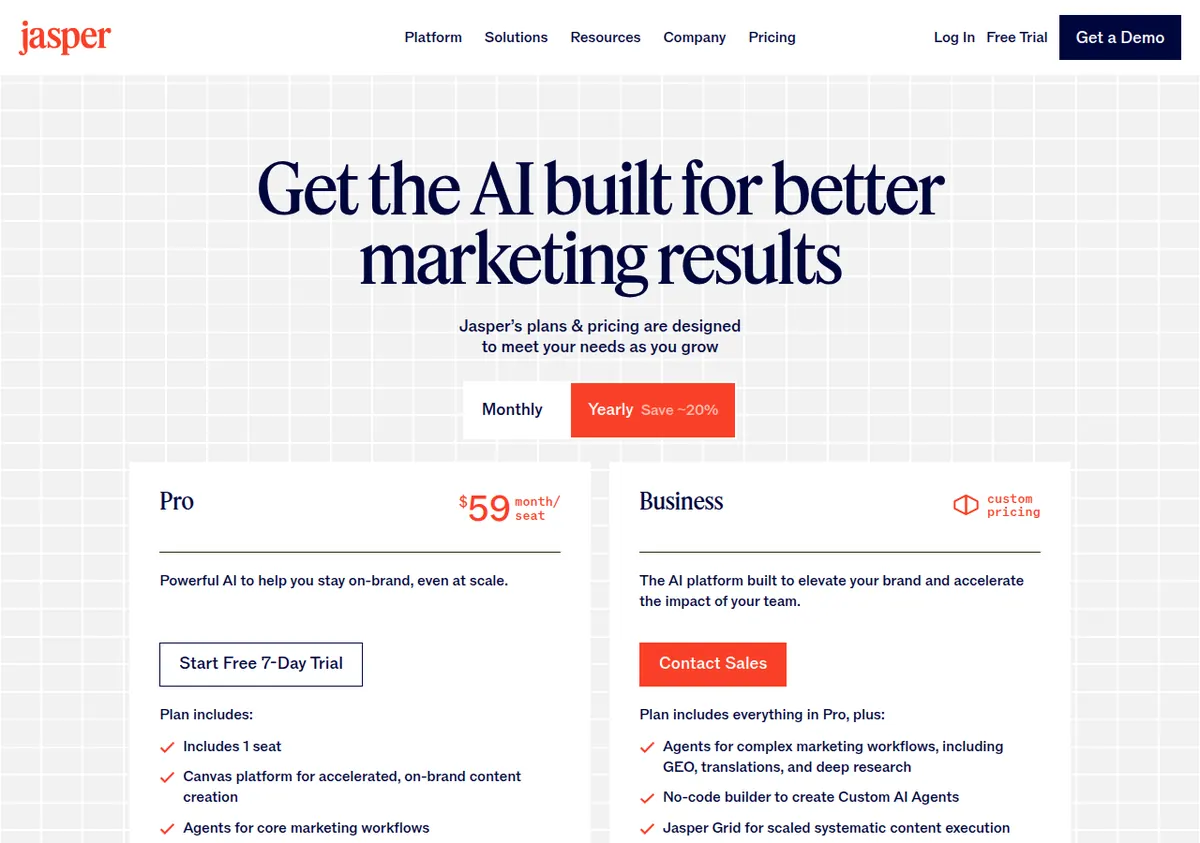
| Tool | Jasper Pro |
| Price | $69/seat/mo monthly, $59/seat/mo on annual billing ($708/seat/yr) |
| Free trial | 7 days on Pro; whether a credit card is required upfront is unverified — check at checkout |
| Brand Voices included | 2 on Pro; unlimited on Business (custom-priced, 12-month minimum reported by third parties) |
| Knowledge assets | 5 on Pro; unlimited on Business |
| Audiences | 3 on Pro; unlimited on Business |
| Free tier | None |
Who should set up a Brand Voice: anyone on the Pro trial deciding whether to convert, and any small team that publishes in a consistent voice and is tired of editing the same generic phrasing out of every draft. Who should skip it: anyone who needs more than 2 voices — if you write for three brands or three very different audiences, Pro’s cap will force you onto the custom-priced Business plan, and you should price that before you invest hours in training. If you are choosing between Jasper and a cheaper writer for general content, start with our Jasper vs. Writesonic comparison; if your main job is SEO blog work, see Semrush Content Toolkit vs. Jasper first.
What Brand Voice actually does
Brand Voice is a style profile. You feed Jasper samples of writing that sounds like you, and Jasper extracts the patterns — sentence length, vocabulary, rhythm, how direct or formal the tone is — and applies them to new output. It is not a memory of facts about your company. That is a different feature: Knowledge assets, of which Pro includes 5. The distinction matters because the most common setup mistake is feeding Brand Voice with facts (product specs, company history) and expecting it to learn style, or feeding Knowledge with style samples and expecting it to learn facts.
Think of it this way:
- Brand Voice answers: how do we sound?
- Knowledge answers: what do we know?
- Audiences answers: who are we talking to? (Pro includes 3.)
A Brand Voice trained on your best product descriptions will not know your product specs. A Knowledge asset loaded with your spec sheets will not make your copy sound like you. You need both, and on Pro you have 5 Knowledge assets to split across products, pricing, and company facts. Plan the split before you start training — the assets are as scarce as the voices.
Before you train: pick your two voices
With only 2 voices on Pro, the choice of which voices to create is the most consequential decision in this tutorial. Do not create one voice per product line, one per channel, or one per writer. Two voices can cover most small teams if you choose them by the dimension that actually changes the writing:
Voice 1 — your default voice. The voice you use for most content: blog posts, product descriptions, emails. This is the voice to train first and train best.
Voice 2 — the contrast voice. The voice for the one context where the default would be wrong. For most teams this is one of three things: a more formal voice for enterprise or B2B buyers, a more playful voice for social media, or a simpler voice for beginner audiences. Pick the contrast that shows up most often in your real work. If no second context shows up often, do not create a second voice yet — leave the slot empty until a real need appears. An empty slot is an option; a bad voice is a sunk cost you have to delete and rebuild.
What does not deserve its own voice: individual writers on the same team (they should converge on one voice, not diverge), individual campaigns (use Knowledge assets for campaign facts), and individual products (use Knowledge assets for product facts). If you find yourself wanting a third voice, that is the signal to price the Business plan — or to accept that two voices plus good Knowledge assets cover the job.
What to feed it: sample selection
Brand Voice learns from examples, and the quality of the examples is the whole game. Jasper does not publish a required sample length or count on its pricing page, so the guidance below is practice based on how style training works in general and on Jasper’s own documentation of the feature — if Jasper’s setup screen asks for a specific amount, follow what the screen says.
The right samples
Feed it your best published writing, and be ruthless about “best.” The ideal sample set has these properties:
- It was written by a human on your team, in the voice you want. Not AI output you lightly edited. Not a competitor’s copy. Not a press release written by an agency three years ago. If the sample does not sound like you at your best, the voice will not either.
- It is recent. Your voice from two years ago is not your voice now. Use pieces from the last 6–12 months.
- It covers the formats you will actually generate. If you will generate product descriptions, feed it product descriptions. If you will generate blog posts, feed it blog posts. A voice trained only on blog posts will write blog-post-shaped product descriptions — long, discursive, and wrong for the format.
- It is varied within the voice. Three samples that all say the same thing in the same structure teach Jasper a template, not a voice. Pick samples that show range: a short punchy piece, a longer explanatory piece, and one that handles a difficult topic (a price increase, a limitation, a comparison).
Sample length: how much is enough
There is no published minimum, but the principle is simple: Jasper needs enough text to distinguish your habits from generic English. A single paragraph is not enough — every company writes a decent paragraph. A useful rule of thumb is to feed each voice several thousand words of your best writing in total, across 3–5 pieces. Below roughly 1,000 words total, the voice has too little to learn from and will drift toward generic output; above roughly 5,000–8,000 words, additional samples add little unless they add new formats or tones.
More important than total length is that the samples agree with each other. Five pieces that all sound like the same company produce a sharp voice. Five pieces that sound like five different companies produce a voice that averages out to nothing — the single most common cause of generic Jasper output. If your samples disagree, do not feed them all in and hope. Pick the three that agree most and train on those.
What never to feed it
- Your homepage hero copy. It is too short, too polished, and too unrepresentative of how you write at length. Hero copy teaches Jasper to write slogans.
- Legal pages, terms, and privacy policies. They teach formality and hedging — exactly the habits you are trying to train out.
- Content you do not like. If a piece embarrasses you, do not include it because you need the word count. The voice will learn its bad habits as faithfully as its good ones.
- Competitor copy. Even if you admire it, it teaches Jasper to sound like them. Your voice should be distinguishable from your competitors’, not a blend of them.
- AI output from another tool. Feeding Jasper another model’s output teaches it that model’s habits, not yours. The result is generic twice over.
The setup, step by step
Step 1 — Collect your samples before opening Jasper. Gather 3–5 pieces per voice, in plain text, with headlines removed if they are clickbait-style (headlines teach Jasper to write headlines everywhere). Note for each piece why you chose it: “best product description,” “best explanation of a complex feature,” “best short social post.” If you cannot say why a piece is in the set, take it out.
Step 2 — Write the voice down in one paragraph, yourself. Before Jasper analyzes anything, write a short description of the voice in your own words: who you sound like, how formal you are, what you never do. Example: “We sound like a knowledgeable colleague, not a salesperson. Short sentences. We name the trade-off instead of hiding it. We never use superlatives we cannot prove.” This paragraph does two things: it forces you to decide what the voice is, and it gives you a test to check the trained voice against later.
Step 3 — Create the voice and upload the samples. In Jasper, create the Brand Voice and add your samples. Give it a name that describes its job, not its source: “Default — blog and product” is a better name than “Voice from Q3 pieces.” A name that describes the job tells the next person on your team when to use it.
Step 4 — Add the Knowledge assets the voice needs. A voice without Knowledge is a style with nothing to say. Use your 5 Knowledge assets for the facts the voice will need most often: your product range and specs, your pricing and shipping terms, your company’s background, and the claims you can and cannot make (certifications, warranties). Load the facts once, carefully, and keep them current — stale Knowledge produces confident errors, which are worse than generic output.
Step 5 — Set the Audience. Pro includes 3 Audiences. Create the audience this voice usually addresses: who they are, what they already know, what they care about. The audience setting is what keeps a voice from writing beginner explanations to expert buyers, or expert jargon to beginners. It is a small setting with an outsized effect on whether output feels right.
Step 6 — Generate a test piece and compare it against your paragraph. Generate a short piece in a format you use often — a product description or a blog introduction — and read it next to your one-paragraph voice description from Step 2. Check three things: does it sound like the description, does it sound like your samples, and would you publish it with light editing? If the answer to all three is yes, the voice works. If the answer is no to any of them, do not start generating real content. Fix the voice first — the next section covers how.
When the output is generic: diagnosing the failure
Generic output has a small number of causes, and they are diagnosable. Work through this list in order before retraining from scratch:
1. The samples disagreed with each other. This is the most common cause. Re-read your sample set. If two pieces sound like different companies, remove the outlier and retrain. One strong, consistent sample set beats five mixed ones.
2. The samples were too short or too few. If you trained on less than about 1,000 words, the voice has not seen enough of your habits to reproduce them. Add one or two more pieces in the same voice and retrain.
3. The prompt did the damage, not the voice. A prompt like “write a product description” invites generic output from any tool, voice or no voice. A prompt that includes the audience, the one fact that matters, and the thing to avoid — “write a product description for a first-time buyer, lead with the 5-year warranty, do not use the word ‘premium’” — gives the voice something specific to do. If your test prompt was vague, the output’s genericness is your prompt’s fault. Test again with a specific prompt before blaming the voice.
4. The Knowledge was missing, so the voice filled the gap with clichés. When Jasper does not know your facts, it reaches for the most common phrasing in its training data — which is, by definition, generic. If your test output contains claims you never made and adjectives you never use, check whether the relevant Knowledge asset exists and is loaded. Add the facts, then regenerate.
5. You are asking the voice to do a format it never saw. A voice trained on blog posts will not write good ad copy, because ad copy has a different shape. Either train the voice on that format (add a sample in the format) or accept that this format needs your second voice slot — or a different tool entirely. For short-form video ad scripts, for example, our blog-post-to-video-ads workflow uses a different tool stack for exactly this reason.
6. The voice is fine; your expectations are not. AI output, even in a good voice, is a first draft. If you expect publish-ready copy, every voice will disappoint you. The honest test is not “would I publish this untouched” but “is this closer to my voice than the same prompt without Brand Voice, and does it save me editing time?” If the answer is yes, the voice is working — use it as a drafting accelerator, not a replacement writer.
How to maintain a voice over time
A Brand Voice is not a one-time setup. It decays in two ways: your company voice drifts as new people write, and your Knowledge goes stale as products and prices change.
Review the voice quarterly. Generate a test piece each quarter and compare it against your one-paragraph description. If the output has drifted — more formal than you are now, or using phrases you stopped using — refresh the samples: replace the oldest piece with your best recent piece and retrain.
Update Knowledge immediately when facts change. A price change, a discontinued product, a new certification — any of these in stale Knowledge becomes a wrong claim in generated copy. Treat Knowledge updates like website updates: part of the launch checklist for any product or pricing change, not a quarterly chore.
Keep a “voice failures” note. Every time generated copy goes wrong in a way that surprises you, note the prompt and the output. Patterns in that note tell you what to fix: repeated generic openings mean the samples are weak; repeated factual errors mean Knowledge is stale; repeated tone misses mean the audience setting is wrong. Without the note, you will fix the same problem three times and forget each time.
Do not duplicate voices across seats. Pro is priced per seat ($59/seat/mo annual, $69 monthly), and each seat is effectively a single user. If two people on your team each build their own version of the company voice, you will get two voices that drift apart. One person owns the voice; everyone else uses it. If your team grows past that model, the Business plan’s unlimited voices and admin controls are the upgrade path — but note that Business pricing is custom and unpublished, so get a quote before promising the team a third voice.
Brand Voice vs. the alternatives
It is worth asking whether Jasper’s Brand Voice is the right way to get consistent voice at all. Three honest comparisons:
- Against a style guide in Grammarly: Grammarly Pro ($12/member/mo annual) includes 1 style guide and 1 brand tone, which enforce rules on text you have already written. Grammarly corrects; Jasper generates. If your team writes first drafts by hand and needs consistency enforced, Grammarly’s style guide is cheaper and more precise. If you need first drafts generated in your voice, Jasper’s Brand Voice is the tool. Many teams end up using both — Jasper to draft, Grammarly to edit — which is the pairing in our SEO blog workflow with Semrush and Grammarly.
- Against Writesonic’s brand voice: Writesonic’s Starter plan ($79/mo annual) includes 1 brand voice, and its focus has shifted to AI search visibility rather than pure writing. If your priority is brand voice alone, Jasper’s 2 voices on Pro beat Writesonic’s 1 on Starter — but if you also need GEO tracking and site audits, Writesonic bundles those and Jasper does not. See Jasper vs. Writesonic for the full comparison, and Writesonic free plan limits for what you can test before paying.
- Against doing it by hand: A shared document of voice examples and a good editor will beat a badly trained Brand Voice every time. The voice feature earns its price only when it saves real editing time across many pieces. If you publish two articles a month, a document and an editor are cheaper. If you publish twenty, the voice pays for itself — provided you stay inside the 2-voice cap.
Limitations / Who Should NOT Buy
- Teams that need more than 2 Brand Voices should not buy Pro expecting to work around the cap. There is no add-on for a third voice on Pro. The only path is the Business plan, whose price is custom, unpublished, and reported by third parties to require a 12-month minimum. Get the quote first.
- Do not buy Jasper for SEO. Jasper has no built-in SEO tool. The usual pairing is Surfer SEO, a separate subscription reported at around $99/mo by third-party sources. If SEO is the main job, the Semrush Content Toolkit comparison linked above is the better starting point.
- Per-seat pricing punishes small teams that grow. Pro is effectively a single-seat plan: 1 seat included, and third parties report roughly $62/mo per additional Pro seat — unverified, so check at checkout. A three-person team on Pro costs materially more than the headline $59/mo suggests.
- Brand Voice cannot fix a company that does not know its own voice. If your existing writing is inconsistent — different tones on the blog, the product pages, and the emails — the trainer will average the inconsistency into generic output. Fix the voice in your human writing first, then train the model on the fixed version.
- The 7-day trial is short for voice training. Training, testing, diagnosing, and retraining a voice takes several sessions. Seven days is enough to test one voice properly if you prepare your samples before the trial starts — which is why this tutorial puts sample collection first. Do not start the trial and then spend three days looking for samples.
- Whether the trial requires a credit card upfront is unverified. One November 2026 review states it does and auto-converts on day 8 unless cancelled. Check at checkout, set a calendar reminder for day 6, and cancel inside the trial if you are not converting — do not rely on remembering.
Sources
- Jasper pricing page (jasper.ai/pricing): Pro $69/mo monthly / $59/mo annual per seat, 1 seat, 2 Brand Voices, 5 Knowledge assets, 3 Audiences; Business custom; 7-day trial.
- Independent pricing checks: HyperWrite (Nov 2026), Chapter (17 Sep 2026), GenerateMore (12 Nov 2026) on Jasper plan limits and trial terms.
- Grammarly plans page (grammarly.com/plans) for style guide and brand tone limits used in the comparison.
Prices checked 13 November 2026. They change — verify on the official pricing page before you buy. Trial card requirements are unverified; check at checkout.